MiniMax H3 Image in ComfyUI: 16 MP Images and Edits in 6 Steps
MiniMax H3 Image is a new 33.1B model that generates and edits 16 MP pictures in 6 steps on your own GPU; our ComfyUI V150 ships two ready presets for it.
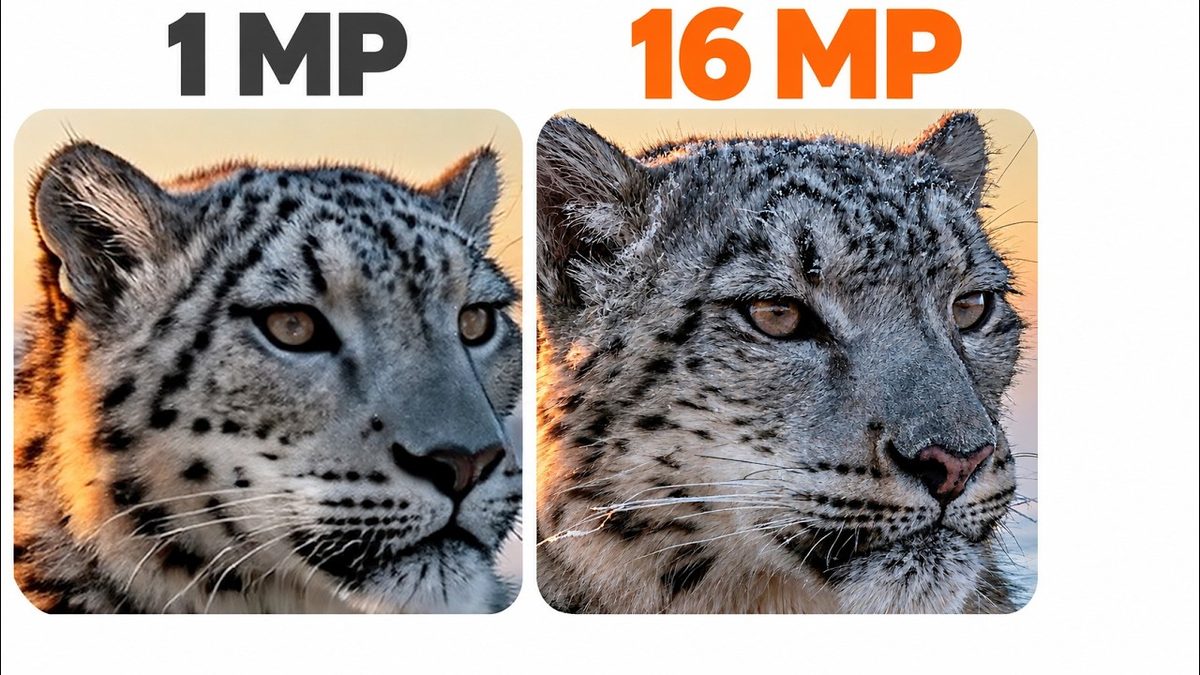
Highlights
Running locally in ComfyUI, it is ultra fast even at 16 MP and works with as low as 6 GB VRAM. The Text To Image 16 MP and Image Edit Up To 16 Images presets include MiniMax's local prompt enhancer, and Model Downloader V190 fetches every model in one bundle.
Video tutorial
Don't Reinstall ComfyUI: Update ComfyUI, SwarmUI, Models and Presets the Right Way (V147) · chapters and summary
More videos: MiniMax H3 Image Is Here: 16 MP Images and Edits in 6 Steps, Running Locally in ComfyUI, ComfyUI for Beginners: Install It, Then Create and Edit AI Images With FLUX 3 Klein
Related
ComfyUI Auto Installer: 1-Click Windows, Linux & Cloud With Presets
ComfyUI auto installer that sets up Sage Attention, Triton, xFormers and Flash Attention in one click, with ready presets for image, video and lip sync models.
ComfyUI & SwarmUI Update: Anima Character Transfer, MOSS-Image Control
ComfyUI V146 and SwarmUI Model Downloader V186 add Anima one-image character transfer and MOSS-Image color and depth control, plus 91 SwarmUI presets in V85.
ComfyUI & SwarmUI on Massed Compute and RunPod: Cloud GPU Tutorial
ComfyUI and SwarmUI set up in 1 click on Massed Compute and RunPod cloud GPUs, with multi-GPU backends for faster Qwen, FLUX and Wan 2.2 generation.