Edit Any Photo by Typing What to Change: FLUX Kontext Dev on Your Own PC (No Masks)
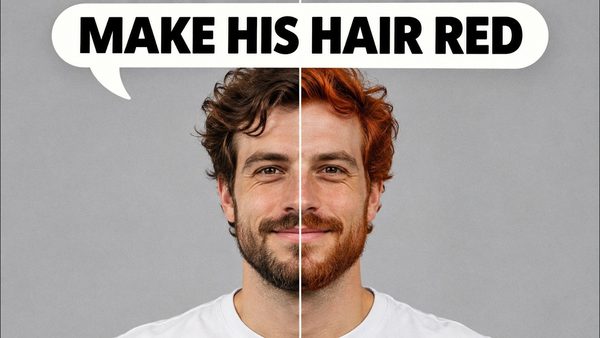
FLUX Kontext Dev edits any part of an image with just a prompt, no mask or ControlNet, and can restore, colorize, outpaint and combine images in SwarmUI.
Published Jun 27, 2025 · 15,896 views · Watch on YouTube
Get the app and files
FLUX Kontext Dev Tutorial: Local Image Editing on Windows
FLUX Kontext Dev edits any part of an image with just a prompt, no mask or ControlNet, and can restore, colorize, outpaint and combine images in SwarmUI.
Chapters
- 0:00 FLUX 1 Kontext Dev Model Showcase & Capabilities
- 0:49 Tutorial Setup: SwarmUI Over ComfyUI for Simplicity
- 1:29 Getting Started: Presets & Prompting Guide
- 1:50 Step 1: Download & Update SwarmUI
- 2:33 Step 2: Running the Model Downloader
- 2:52 Step 3: Downloading the FLUX Kontext Dev Model
- 3:45 Step 4: Critical Update of ComfyUI & SwarmUI
- 4:21 Step 5: Importing the Latest SwarmUI Presets
- 5:03 Step 6: Applying the FLUX Preset & Loading an Image
- 5:21 CRITICAL: Setting the Correct Model Architecture
- 5:50 How to Set Image Resolution & Aspect Ratio
- 6:33 Example 1: Changing Hair Color with Natural Prompts
- 6:57 Reserve VRAM to prevent slowness
- 7:26 Analyzing the First Result & Quality Preservation
- 8:09 Example 2: Converting to Anime Style & Image Creativity
- 9:14 Example 3: Multi-Image Interaction by Stitching Images
- 9:54 Generating a Combined Scene with a Detailed Prompt
- 10:49 Generating a High-Resolution Version Natively
- 11:52 Example 4: Outpainting Strategy with a Larger Canvas
- 12:31 Generating the Outpainted Image
- 13:05 Example 5: Creating the Famous Ghibli Style
- 13:49 Pro Tip: Generating Higher Resolutions Automatically
- 14:43 Example 6: High-Quality Latent Upscaling for Anime
- 15:55 Example 7: Restoring & Colorizing an Old Photo
- 16:39 Analyzing the Amazing Photo Restoration Result
- 17:16 How to Run on a Private Cloud (RunPod & Massed Compute)
- 18:08 Cloud GPU Price & Performance Comparison
- 18:35 Final Words & How to Get Support
About this video
Black Forest Labs (BFL) publisher of FLUX models kept their promise and published the FLUX.1 Kontex DEV model today. So I didn't sleep and after doing huge research and test non-stop, I have prepared this excellent step by step tutorial that will show you how to use this amazing model. With FLUX Kontext you can edit any part of the image in any way with just prompt. No-masking, no-ControlNet. It can also restore and upscale older images or it can do outpainting. It can even combine multiple images into a new image. FLUX Kontext can even colorize old black and white images. This model is extremely robust and versatile for so many tasks.
🔗Follow below link to download the zip file that contains SwarmUI installer and AI models downloader Gradio App - the one used in the tutorial ⤵️
▶️ https://www.patreon.com/posts/SwarmUI-Installer-AI-Videos-Downloader-114517862
▶️ How to install SwarmUI main tutorial : https://youtu.be/fTzlQ0tjxj0
🔗Follow below link to download the zip file that contains ComfyUI 1-click installer that has all the Flash Attention, Sage Attention, xFormers, Triton, DeepSpeed, RTX 5000 series support ⤵️
▶️ https://www.patreon.com/posts/Advanced-ComfyUI-1-Click-Installer-105023709
🔗 Python, Git, CUDA, C++, FFMPEG, MSVC installation tutorial - needed for ComfyUI ⤵️
▶️ https://youtu.be/DrhUHnYfwC0
🔗 SECourses Official Discord 10500+ Members ⤵️
▶️ https://discord.com/servers/software-engineering-courses-secourses-772774097734074388
🔗 Stable Diffusion, FLUX, Generative AI Tutorials and Resources GitHub ⤵️
▶️ https://github.com/FurkanGozukara/Stable-Diffusion
🔗 SECourses Official Reddit - Stay Subscribed To Learn All The News and More ⤵️
▶️ https://www.reddit.com/r/SECourses/
Video Chapters
0:00 FLUX 1 Kontext Dev Model Showcase & Capabilities
0:49 Tutorial Setup: SwarmUI Over ComfyUI for Simplicity
1:29 Getting Started: Presets & Prompting Guide
1:50 Step 1: Download & Update SwarmUI
2:33 Step 2: Running the Model Downloader
2:52 Step 3: Downloading the FLUX Kontext Dev Model
3:45 Step 4: Critical Update of ComfyUI & SwarmUI
4:21 Step 5: Importing the Latest SwarmUI Presets
5:03 Step 6: Applying the FLUX Preset & Loading an Image
5:21 CRITICAL: Setting the Correct Model Architecture
5:50 How to Set Image Resolution & Aspect Ratio
6:33 Example 1: Changing Hair Color with Natural Prompts
6:57 Reserve VRAM to prevent slowness
7:26 Analyzing the First Result & Quality Preservation
8:09 Example 2: Converting to Anime Style & Image Creativity
9:14 Example 3: Multi-Image Interaction by Stitching Images
9:54 Generating a Combined Scene with a Detailed Prompt
10:49 Generating a High-Resolution Version Natively
11:52 Example 4: Outpainting Strategy with a Larger Canvas
12:31 Generating the Outpainted Image
13:05 Example 5: Creating the Famous Ghibli Style
13:49 Pro Tip: Generating Higher Resolutions Automatically
14:43 Example 6: High-Quality Latent Upscaling for Anime
15:55 Example 7: Restoring & Colorizing an Old Photo
16:39 Analyzing the Amazing Photo Restoration Result