The Famous AI Squish Effect on Your Own PC: Wan 2.1 Image to Video With the Squish LoRA
Wan 2.1 Gradio app for text to video, image to video and video to video that runs with as low as 4 GB VRAM and batch processes whole folders.
Published Mar 10, 2025 · 5,517 views · Watch on YouTube
Get the app and files
Wan 2.1 Gradio App: 1-Click Install, 4 GB VRAM, T2V, I2V & V2V
Wan 2.1 Gradio app for text to video, image to video and video to video that runs with as low as 4 GB VRAM and batch processes whole folders.

Wan 2.1 Windows App Now Supports Sage Attention, 37% Faster
SECourses Wan 2.1 Windows app now runs with Sage Attention, 37% faster than Flash Attention, and is 1-click to install into a Python 3.10 venv without WSL.
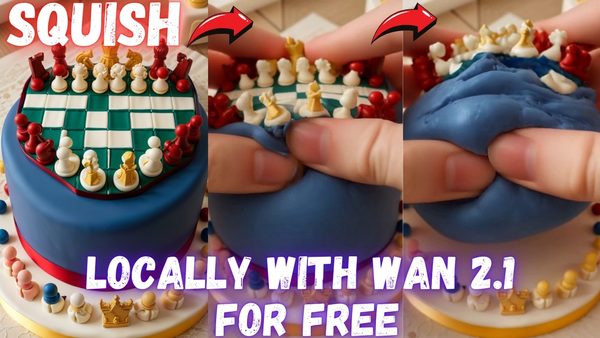
Wan 2.1 Gradio App Updates Tutorial: Squish Effect LoRA Videos Locally
Wan 2.1 Gradio app now supports LoRAs; this tutorial makes squishing videos with the Squish Effect LoRA and shows RIFE FPS boost, FP8/BF16 and config saving.
Chapters
- 0:00 Introduction & Wan 2.1 Updates: Overview of new features and the Squishing LoRA effect.
- 0:10 Squishing Video Effect (LoRA) & New Features: Exploring the new LoRA and updates like FP8, BF16.
- 0:29 Application Updates and Demonstrations: Showing "Save Prompt to File" and config saving.
- 0:45 RIFE for FPS Boost, FP8/BF16 Options, and LoRA Support
- 1:02 Improved "Save Prompt to File" & Configuration System: How saving prompts and configs works.
- 1:19 Configuration Saving Demonstration (Example: "My Squish LoRA"): A practical example of config use.
- 1:37 Using the Application & Installation Tutorial Link
- 2:05 Navigating the Update Log and Finding Installation Instructions: Step-by-step setup guide.
- 2:33 Downloading, Installing, and Running the Installation Script
- 3:11 Downloading Models and Model Selection Options: Choosing the right model for your needs (480p, 720p).
- 3:44 Downloading Specific Models and File Size Optimizations: How to manage download size.
- 4:11 Starting the Application & Troubleshooting Triton Errors: Fixing common startup issues.
- 4:35 Interface Overview, Model Selection, and GPU Preset Settings: Configuring the application.
- 5:00 "Apply Practical RIFE" for FPS Boost and Smoothness Demonstration: Before/after RIFE comparison.
- 5:29 RIFE Model Details, Prompt Setup, and LoRA Activation Word: Using the Squish LoRA effectively.
- 6:00 Selecting the LoRA in the Interface and Uploading Your Image: Preparing for image-to-video.
- 6:39 Parameter Verification, Kudos to the Creator, and Frame Count Explanation: Setting up the generation.
- 7:11 Reducing Inference Steps for Faster Generation and Monitoring GPU Usage: Optimizing speed.
- 7:55 Generation Time, Future Speed Improvements (Teacache), and Implementation Details
- 8:24 Current Optimizations (Triton, CUDA, Torch, Flash Attention) and Comparison to ComfyUI
- 8:54 VRAM Usage, Quality Focus, and Finding Other Compatible LoRAs on CivitAI
- 9:34 CivitAI LoRA Search, Generation Progress, and Speed on RTX 5090: Real-world performance.
- 9:51 Main Tutorial Video Recommendation and Prompt Enhance Improvements
- 10:27 Continuous Application Improvements, Future Plans (Hunyuan Video), and Tiled VAE
- 10:58 Generation Completion and Example Video Review: Assessing the final output quality
- 11:11 Introducing to MMAudio: Brief introduction to MMAudio application
- 11:32 MMAudio demo and explanation: showing example and basic prompt
- 12:03 Speed of MMAudio and coming tutorial: demonstration of generation speed
- 12:14 MMAudio multiple seed generation: Generating multiple seeds for better output
- 12:41 MMAudio features and showing examples
- 13:12 Conclusion, Resource Links, and Call to Action
About this video
Squish Effect LoRA arrived to Wan 2.1. Wan 2.1 is the truly State of the Art (SOTA) Open Source video generation model that supports Text to Video (T2V), Video to Video (V2V) and Image to Video (I2V). Now our ultra advanced 1-Click Gradio application supports LoRAs and today I will show you all the new developments to our Wan 2.1 all in one video generation Gradio App. We have added so many new features since the original Wan 2.1 step by step tutorial and we continue to improve our App on a daily bases with amazing updates.
🔗 Full Instructions, Configs, Installers, Information and Links Shared Post (the one used in the tutorial) ⤵️
▶️ https://www.patreon.com/posts/click-to-open-post-used-in-tutorial-123105403
🔗 Original Main Tutorial Video
🔗 Wan 2.1 AI Video Model: Ultimate Step-by-Step Tutorial for Windows & Affordable Private Cloud Setup ⤵️
▶️ https://youtu.be/hnAhveNy-8s
🔗 SECourses Official Discord 9500+ Members ⤵️
▶️ https://discord.com/servers/software-engineering-courses-secourses-772774097734074388
🔗 Stable Diffusion, FLUX, Generative AI Tutorials and Resources GitHub ⤵️
▶️ https://github.com/FurkanGozukara/Stable-Diffusion
🔗 SECourses Official Reddit - Stay Subscribed To Learn All The News and More ⤵️
▶️ https://www.reddit.com/r/SECourses/
🔗 MSI RTX 5090 TRIO FurMark Benchmarking + Overclocking + Noise Testing and Comparing with RTX 3090 TI ⤵️
▶️ https://youtu.be/uV3oqdILOmA
🔗 RTX 5090 Tested Against FLUX DEV, SD 3.5 Large, SD 3.5 Medium, SDXL, SD 1.5, AMD 9950X + RTX 3090 TI ⤵️
▶️ https://youtu.be/jHlGzaDLkto
If you want to have Squish it: AI Squish Video Art locally for free forever, our app and Squish LoRA and Wan 2.1 is all you need. Watch this tutorial to learn all. Moreover this tutorial will show you majority of the newest features we have implemented with non-stop working for 10 days.
Hopefully many more updates coming soon.
Video Chapters
0:00 Introduction & Wan 2.1 Updates: Overview of new features and the Squishing LoRA effect.
0:10 Squishing Video Effect (LoRA) & New Features: Exploring the new LoRA and updates like FP8, BF16.
0:29 Application Updates and Demonstrations: Showing "Save Prompt to File" and config saving.
0:45 RIFE for FPS Boost, FP8/BF16 Options, and LoRA Support
1:02 Improved "Save Prompt to File" & Configuration System: How saving prompts and configs works.
1:19 Configuration Saving Demonstration (Example: "My Squish LoRA"): A practical example of config use.
1:37 Using the Application & Installation Tutorial Link
2:05 Navigating the Update Log and Finding Installation Instructions: Step-by-step setup guide.
2:33 Downloading, Installing, and Running the Installation Script
3:11 Downloading Models and Model Selection Options: Choosing the right model for your needs (480p, 720p).
3:44 Downloading Specific Models and File Size Optimizations: How to manage download size.
4:11 Starting the Application & Troubleshooting Triton Errors: Fixing common startup issues.
4:35 Interface Overview, Model Selection, and GPU Preset Settings: Configuring the application.
5:00 "Apply Practical RIFE" for FPS Boost and Smoothness Demonstration: Before/after RIFE comparison.
5:29 RIFE Model Details, Prompt Setup, and LoRA Activation Word: Using the Squish LoRA effectively.
6:00 Selecting the LoRA in the Interface and Uploading Your Image: Preparing for image-to-video.
6:39 Parameter Verification, Kudos to the Creator, and Frame Count Explanation: Setting up the generation.
7:11 Reducing Inference Steps for Faster Generation and Monitoring GPU Usage: Optimizing speed.
7:55 Generation Time, Future Speed Improvements (Teacache), and Implementation Details
8:24 Current Optimizations (Triton, CUDA, Torch, Flash Attention) and Comparison to ComfyUI
8:54 VRAM Usage, Quality Focus, and Finding Other Compatible LoRAs on CivitAI