Run Ideogram 4 on Your Own PC: Recreate Any Image With Perfect JSON Prompts
Ostris AI-Toolkit installs automatically on Windows, RunPod, SimplePod and Massed Compute and is now patched to train on custom single-file base models.
Published Jul 04, 2026 · 1,805 views · Watch on YouTube
Get the app and files
Ostris AI-Toolkit 1-Click Installers: LoRA Training on Windows & Cloud
Ostris AI-Toolkit installs automatically on Windows, RunPod, SimplePod and Massed Compute and is now patched to train on custom single-file base models.
Ultimate Image Captioner Pro: Qwen3 VL & JoyCaption JSON Captioning
Ultimate Image Captioner Pro writes JSON and text captions with Qwen3 VL 8B Instruct and Joy Caption models for Ideogram 4 JSON prompting and training.
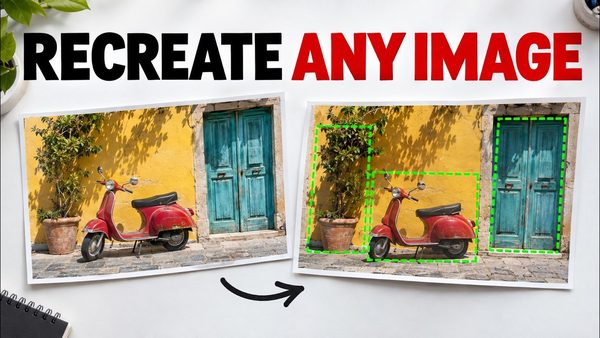
Ideogram 4 JSON Prompting Tutorial With Ultimate Image Captioner Pro
Ideogram 4 runs locally in SwarmUI and ComfyUI with Turbo, Balanced and Highest Quality presets; the masterclass teaches accurate JSON prompts.
Chapters
- 0:00 Ideogram 4 overview: JSON prompting, SwarmUI presets, ComfyUI workflows, and model bundle
- 0:53 Ultimate Image Captioner Pro for turning reference images into Ideogram JSON prompts
- 1:10 Editing JSON elements, bounding boxes, wanted text fields, captions, and prompt layout
- 2:02 Regeneration examples showing structure, objects, scene layout, and image text matching
- 3:18 Captioner Pro feature tour: Qwen, JoyCaption, saved outputs, and JSON builder
- 4:30 Dataset workflow: prompt presets, batch folder captioning, and automatic VRAM presets
- 5:13 Tutorial roadmap: ComfyUI update, SwarmUI update, model download, app install, usage
- 5:40 Updating ComfyUI by extracting the latest installer zip and overwriting old files
- 5:56 Optional fresh ComfyUI venv rebuild for fixing outdated or broken installations
- 6:15 Running the ComfyUI update script, Python choice, UV speed, and quant support
- 7:05 Installing recommended custom nodes bundle 100 for ComfyUI and SwarmUI compatibility
- 7:50 Launching fresh ComfyUI and testing the Ideogram Turbo preset workflow
- 8:47 Setting width, height, resolution, and matching prompt aspect ratio
- 9:07 Updating SwarmUI with the latest zip, overwrite method, and safe folder paths
- 9:48 Automatic .NET SDK 10 install and why SwarmUI needs the correct SDK version
- 10:51 SwarmUI backend setup: ComfyUI backend, Triton, Sage Attention cautions, extra args
- 11:44 Downloading the Ideogram 4 core bundle with hash verification
- 12:28 16-connection parallel downloads, target folders, ComfyUI mode, and URL downloader
- 13:20 Merging model parts and sharing SwarmUI models through extra_model_paths.yaml
- 13:51 Setting SwarmUI model root to reuse another model folder and avoid duplicates
- 14:12 Updating SwarmUI presets with delete import, normal import, overwrite, and backup
- 14:58 Refreshing presets and confirming Ideogram Turbo, Balanced, and Highest Quality
- 15:14 First simple Ideogram prompt, false safety filter block, and weak plain prompting
- 15:34 Using Realism Engine Ideogram 5 LoRA to fix the blocked car prompt
- 15:57 Why detailed JSON prompts are needed and downloading Captioner Pro
- 16:23 Installing Captioner Pro with Windows install update app, venv, and model downloads
- 16:34 Windows requirements: Python, CUDA, cuDNN, C++ tools, FFmpeg, Git, and setup guide
- 17:03 Cloud/Linux notes plus Massed Compute interface, creator image, GPU, and coupon
- 17:34 Captioner installer downloader: 16 connections, hash checks, and accurate setup
- 17:57 Starting Ultimate Image Captioner Pro and saving custom user presets
- 18:14 Loading the Bugatti reference image and generating official Ideogram JSON
- 18:39 Prompt generation speed, copying the prompt, and understanding VRAM usage
- 19:09 Subprocess mode to release all VRAM and RAM after each captioning run
- 19:54 Reviewing generated JSON: high level description, visible text, boxes, and details
- 20:21 Pasting JSON into SwarmUI and matching the custom 5:3 aspect ratio
- 20:43 Aspect ratio calculator, side length control, and high resolution generation
- 21:36 Comparing with and without aspect ratio metadata and avoiding false safety blocks
- 21:58 Realism Engine LoRA strength, when to use it, and output comparison
- 22:34 Choosing Turbo, Balanced, or Highest Quality and testing Turbo speed
- 22:54 Ideogram 4 image to image, inpainting, image creativity, and image prompts
- 23:19 Captioner Pro batch folder processing: subfolders, overwrite, and append modes
- 23:35 Post processing captions with prefixes, suffixes, replacements, and sensitivity
- 24:07 Final options, auto quantization by GPU VRAM, support channels, and closing
About this video
Learn how to run Ideogram 4 locally with SwarmUI and ComfyUI, download the required model bundle, use ready Turbo/Balanced/Highest Quality presets, and create accurate structured JSON prompts with Ultimate Image Captioner Pro for image recreation, text rendering, batch captioning, and training dataset preparation.
Tutorial Links:
🖼️ Ultimate Image Captioner Pro:
https://www.patreon.com/SECourses/posts/ultimate-image-captioner-pro-162527725
🐝 SwarmUI installer, model downloader and presets:
https://www.patreon.com/SECourses/posts/swarm-ui-installer-model-downloader-114517862
🧩 ComfyUI installer:
https://www.patreon.com/SECourses/posts/comfyui-installer-105023709
🎬 Windows requirements tutorial:
⚙️ Requirements post with links/screenshots:
https://www.patreon.com/SECourses/posts/requirements-tutorial-step-by-step-written-111553210
💬 Discord support:
https://discord.com/invite/software-engineering-courses-secourses-772774097734074388
⭐ SECourses GitHub:
https://github.com/FurkanGozukara/Stable-Diffusion
Chapters:
0:00 Ideogram 4 overview: JSON prompting, SwarmUI presets, ComfyUI workflows, and model bundle
0:53 Ultimate Image Captioner Pro for turning reference images into Ideogram JSON prompts
1:10 Editing JSON elements, bounding boxes, wanted text fields, captions, and prompt layout
2:02 Regeneration examples showing structure, objects, scene layout, and image text matching
3:18 Captioner Pro feature tour: Qwen, JoyCaption, saved outputs, and JSON builder
4:30 Dataset workflow: prompt presets, batch folder captioning, and automatic VRAM presets
5:13 Tutorial roadmap: ComfyUI update, SwarmUI update, model download, app install, usage
5:40 Updating ComfyUI by extracting the latest installer zip and overwriting old files
5:56 Optional fresh ComfyUI venv rebuild for fixing outdated or broken installations
6:15 Running the ComfyUI update script, Python choice, UV speed, and quant support
7:05 Installing recommended custom nodes bundle 100 for ComfyUI and SwarmUI compatibility
7:50 Launching fresh ComfyUI and testing the Ideogram Turbo preset workflow
8:47 Setting width, height, resolution, and matching prompt aspect ratio
9:07 Updating SwarmUI with the latest zip, overwrite method, and safe folder paths
9:48 Automatic .NET SDK 10 install and why SwarmUI needs the correct SDK version
10:51 SwarmUI backend setup: ComfyUI backend, Triton, Sage Attention cautions, extra args
11:44 Downloading the Ideogram 4 core bundle with hash verification
12:28 16-connection parallel downloads, target folders, ComfyUI mode, and URL downloader
13:20 Merging model parts and sharing SwarmUI models through extra_model_paths.yaml
13:51 Setting SwarmUI model root to reuse another model folder and avoid duplicates
14:12 Updating SwarmUI presets with delete import, normal import, overwrite, and backup
14:58 Refreshing presets and confirming Ideogram Turbo, Balanced, and Highest Quality
15:14 First simple Ideogram prompt, false safety filter block, and weak plain prompting