Qwen Image vs FLUX: Which AI Image Model Wins? I Ran 700+ Generations
Qwen Image, free and open source, is unchallenged at complex prompts and text on images; these raw SwarmUI thumbnails used Gemini 2.5 Pro prompts.
Published Aug 07, 2025 · 5,749 views · Watch on YouTube
Get the app and files
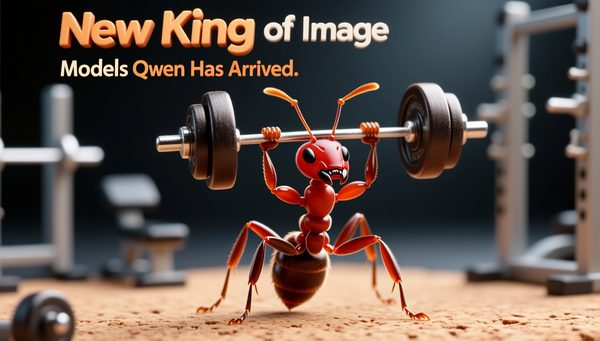
Qwen Image Showcase: Complex Prompts & Text Rendering for Thumbnails
Qwen Image, free and open source, is unchallenged at complex prompts and text on images; these raw SwarmUI thumbnails used Gemini 2.5 Pro prompts.
Chapters
- 0:00 Introducing Qwen Image: The New King of Text-to-Image
- 0:22 Why Qwen is King: 700+ Generations & Extensive Testing
- 0:45 Qwen vs FLUX Models: A Detailed Comparison of Strengths & Weaknesses
- 1:15 One-Click Setup: Easy Installation & Pre-configured Presets
- 1:31 Secret to Perfect Prompts: A Surprising Automatic Generation Method
- 1:53 Low VRAM? No Problem with SwarmUI & ComfyUI Backend
- 2:21 Real-Time Image Generation Showcase (Dragons & Warriors)
- 3:14 Tutorial: How to Automatically Generate Prompts from Reference Images
- 3:41 Essential Prerequisites: Updating SwarmUI & ComfyUI
- 4:07 Step 1: Download & Extract the Newest Zip File (Version 62)
- 4:27 Step 2: Running the Update Scripts for ComfyUI & SwarmUI
- 5:07 Step 3: Importing the New Qwen Presets into SwarmUI
- 5:35 Exploring the New Presets: High Quality vs Realism Fast
- 6:21 Step 4: Downloading the Required Qwen Core Models
- 7:05 Low VRAM Alternative: Using the Q4 Quantized Model
- 7:34 Important Troubleshooting: How to Fix Potential Black Image Bugs
- 8:07 Qwen Technical Details: Resolution Requirements & Advantages
- 8:55 Analyze My Tests: Accessing & Using the Comparison Grids
- 9:53 Amazing In-Image Text Generation: Creating YouTube Thumbnails with Qwen
- 11:43 In-Depth Comparison Grid: Qwen vs FLUX Dev & FLUX Krea
- 12:25 Visual Comparison: Anime, Dinosaurs, and Complex Scenes
- 12:53 Realism Comparison: Where FLUX Krea Still Wins (For Now)
- 13:13 Mind-Blowing Prompt Following: Qwen's Biggest Strength
- 14:07 The Future of Qwen: Fine-Tuning & LoRA Training with Kohya
- 14:34 Final Thoughts & My Remote Generation Setup (Vast.ai)
- 15:40 Pro Tip: Using Wildcards for Automated Batch Image Generation
- 16:11 Final Image Showcase & Conclusion
About this video
I have done over 700 generations to find out the very best configuration for generating the very best images in Qwen Image model. After this research I have published 1-click to use presets with maximum quality and realism. Furthermore, I have compared Qwen Image model to the current king FLUX Dev and FLUX Krea Dev. I have concluded that the new king is Qwen Image and it is the future. This full step by step tutorial and guide video is for you to start generating the most amazing images with Qwen Image with most easy way.
🔗Follow below link to download the zip file that contains SwarmUI installer and AI models downloader Gradio App - the one used in the tutorial for downloading models, presets, prompt generator guide txt ⤵️
▶️ https://www.patreon.com/posts/SwarmUI-Installer-AI-Videos-Downloader-114517862
▶️ How to install SwarmUI main tutorial : https://youtu.be/fTzlQ0tjxj0
🔗Follow below link to download the zip file that contains ComfyUI 1-click installer that has all the Flash Attention, Sage Attention, xFormers, Triton, DeepSpeed, RTX 5000 series support ⤵️
▶️ https://www.patreon.com/posts/Advanced-ComfyUI-1-Click-Installer-105023709
▶️ RunPod SwarmUI & ComfyUI Install Tutorial : https://youtu.be/R02kPf9Y3_w
▶️ Massed Compute SwarmUI & ComfyUI Install Tutorial : https://youtu.be/8cMIwS9qo4M
🔗 Python, Git, CUDA, C++, FFMPEG, MSVC installation tutorial - needed for ComfyUI ⤵️
▶️ https://youtu.be/DrhUHnYfwC0
🔗 SECourses Official Discord 10500+ Members ⤵️
▶️ https://discord.com/servers/software-engineering-courses-secourses-772774097734074388
🔗 Stable Diffusion, FLUX, Generative AI Tutorials and Resources GitHub ⤵️
▶️ https://github.com/FurkanGozukara/Stable-Diffusion
🔗 SECourses Official Reddit - Stay Subscribed To Learn All The News and More ⤵️
▶️ https://www.reddit.com/r/SECourses/
Video Chapters
0:00 Introducing Qwen Image: The New King of Text-to-Image
0:22 Why Qwen is King: 700+ Generations & Extensive Testing
0:45 Qwen vs FLUX Models: A Detailed Comparison of Strengths & Weaknesses
1:15 One-Click Setup: Easy Installation & Pre-configured Presets
1:31 Secret to Perfect Prompts: A Surprising Automatic Generation Method
1:53 Low VRAM? No Problem with SwarmUI & ComfyUI Backend
2:21 Real-Time Image Generation Showcase (Dragons & Warriors)
3:14 Tutorial: How to Automatically Generate Prompts from Reference Images
3:41 Essential Prerequisites: Updating SwarmUI & ComfyUI
4:07 Step 1: Download & Extract the Newest Zip File (Version 62)
4:27 Step 2: Running the Update Scripts for ComfyUI & SwarmUI
5:07 Step 3: Importing the New Qwen Presets into SwarmUI
5:35 Exploring the New Presets: High Quality vs Realism Fast
6:21 Step 4: Downloading the Required Qwen Core Models
7:05 Low VRAM Alternative: Using the Q4 Quantized Model
7:34 Important Troubleshooting: How to Fix Potential Black Image Bugs
8:07 Qwen Technical Details: Resolution Requirements & Advantages
8:55 Analyze My Tests: Accessing & Using the Comparison Grids
9:53 Amazing In-Image Text Generation: Creating YouTube Thumbnails with Qwen
11:43 In-Depth Comparison Grid: Qwen vs FLUX Dev & FLUX Krea
12:25 Visual Comparison: Anime, Dinosaurs, and Complex Scenes
12:53 Realism Comparison: Where FLUX Krea Still Wins (For Now)
13:13 Mind-Blowing Prompt Following: Qwen's Biggest Strength