Mind-Blowing Deepfake Tutorial: Turn Anyone into Your Fav Movie Star! Better than Roop & Face Fusion
Rope is an advanced open source deepfake and face swap app; these 1-click installers set up Rope Live and Rope Alucard with RTX 5000 GPU support.
Published May 29, 2024 · 58,778 views · Watch on YouTube
Get the app and files
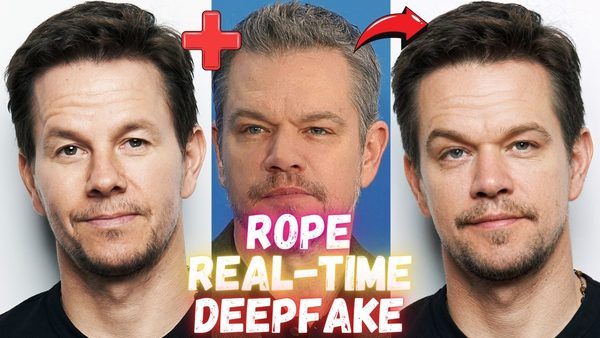
Rope Face Swap App: 1-Click Rope Live, Alucard & NEXT Installers
Rope is an advanced open source deepfake and face swap app; these 1-click installers set up Rope Live and Rope Alucard with RTX 5000 GPU support.

Rope NEXT Update: Rope Live and Rope Alucard Versions Updated
Rope NEXT updates Rope Live and Rope Alucard face swap versions with faster model downloads, Ubuntu fixes for Massed Compute and CUDA 11.8 and 12.4 support.
Rope Pearl Live Tutorial: Real-Time Webcam DeepFake & Face Swapping
Rope Pearl Live swaps faces in real time on your webcam; the tutorial covers simple installation on Windows and a TensorRT speed boost on an RTX 3090 Ti.
Rope Pearl Deepfake Tutorials: Full HD Face Swap on Windows & Cloud
Rope, a 1-click open source deepfake app, swaps multiple faces in videos up to 4K; the tutorials cover Windows and a no-GPU Massed Compute cloud machine.
Chapters
- 0:00 Example Deepfake video from movie Inglourious Basterds 2009
- 0:21 Introduction to the most easy to use and most advanced 1-Click Deepfake application Rope Pearl
- 0:53 How to download 1-Click installer scripts and start installing Rope Pearl
- 1:34 What are the requirements of Deepfake app Rope Pearl and how to check and install them
- 1:44 How to check and verify your Python, Git, CUDA and FFmpeg installations
- 3:42 Example images and a test video that I prepared and sharing
- 4:10 How to start Rope Deepfake application after the installation has been completed
- 4:27 How to use Rope Pearl Deepfake application - first select videos and images folders
- 5:00 How to refresh and re-populate selected videos and faces folders
- 5:26 How to set the outputs folder where the Deepfake videos and images will be saved
- 5:45 How Rope Pearl the most advanced Deepfake application work, select input video and target faces
- 6:34 How to make swapped, deep faked faces HD from low resolution
- 7:01 How to further improve face quality with face restoration AI models automatically
- 7:49 How to make additional changes to fix artifacts and mistakes in the Deepfaked video
- 8:27 Support link to support author of Rope developer
- 8:37 How to test and see each changes effect immediately
- 9:00 The tests and configurations I have pre-prepared for you
- 9:19 How to use Face Parser to fix the mouth movement
- 9:53 How to reduce VRAM usage and increase processing speed with number of threads
- 10:13 How to export and save Deepfake applied new video
- 12:12 Where will be the output / exported video saved
- 12:33 Important face detection models Retina face, Yolo and SCRDF - try them if face detection fails
- 13:34 How to understand when the Deepfake video processing is completed
- 13:59 Properties of the generated Deepfake video, e.g. resolution, bitrate
- 14:24 How to Deep Fake / Face Swap images not videos
- 15:30 How to save deep faked images
- 15:43 What is auto swap and how to use it
- 16:10 How to find best working face before start processing the video
- 17:13 How to automatically install and use Rope DeepFake AI on a Linux system
About this video
#Rope is the newest 1-Click, most easy to use, most advanced open source Deep Fake application. It has been just published yesterday. In this tutorial I will show you how to use Rope Pearl DeepFake application. Rope is way better than Roop, #Roop Unleashed and #FaceFusion. It supports multi-face Face Swapping and making amazing DeepFake videos so easily with 1-Click. Select video, select faces and generate your DeepFake 4K ultra-HD video.
1-Click Rope Installers Scripts ⤵️
https://www.patreon.com/posts/most-advanced-1-105123768
How To Install Requirements Tutorial (Python, Git, FFmpeg, CUDA, C++ Tools) ⤵️
Official Rope GitHub Repository ⤵️
https://github.com/Hillobar/Rope
Rope's Author Donation Link - Support Him For Better APP ⤵️
https://www.paypal.com/donate/?hosted_button_id=Y5SB9LSXFGRF2
0:00 Example Deepfake video from movie Inglourious Basterds 2009
0:21 Introduction to the most easy to use and most advanced 1-Click Deepfake application Rope Pearl
0:53 How to download 1-Click installer scripts and start installing Rope Pearl
1:34 What are the requirements of Deepfake app Rope Pearl and how to check and install them
1:44 How to check and verify your Python, Git, CUDA and FFmpeg installations
3:42 Example images and a test video that I prepared and sharing
4:10 How to start Rope Deepfake application after the installation has been completed
4:27 How to use Rope Pearl Deepfake application - first select videos and images folders
5:00 How to refresh and re-populate selected videos and faces folders
5:26 How to set the outputs folder where the Deepfake videos and images will be saved
5:45 How Rope Pearl the most advanced Deepfake application work, select input video and target faces
6:34 How to make swapped, deep faked faces HD from low resolution
7:01 How to further improve face quality with face restoration AI models automatically
7:49 How to make additional changes to fix artifacts and mistakes in the Deepfaked video
8:27 Support link to support author of Rope developer
8:37 How to test and see each changes effect immediately
9:00 The tests and configurations I have pre-prepared for you
9:19 How to use Face Parser to fix the mouth movement
9:53 How to reduce VRAM usage and increase processing speed with number of threads
10:13 How to export and save Deepfake applied new video
12:12 Where will be the output / exported video saved
12:33 Important face detection models Retina face, Yolo and SCRDF - try them if face detection fails
13:34 How to understand when the Deepfake video processing is completed
13:59 Properties of the generated Deepfake video, e.g. resolution, bitrate
14:24 How to Deep Fake / Face Swap images not videos
15:30 How to save deep faked images
15:43 What is auto swap and how to use it
16:10 How to find best working face before start processing the video
17:13 How to automatically install and use Rope DeepFake AI on a Linux system
Deepfake Tutorial: Rope-Pearl Application for Face Swapping in Videos and Images
Installation