Hi3DGen Full Tutorial With Ultra Advanced App to Generate the Very Best 3D Meshes from Static Images
Hi3DGen turns a single image into a detailed, UV-unwrapped 3D mesh on your own PC; on an RTX 5090 our dwarf example became a 344,622-face mesh in 1 minute.
Published Jun 06, 2025 · 4,216 views · Watch on YouTube
Get the app and files
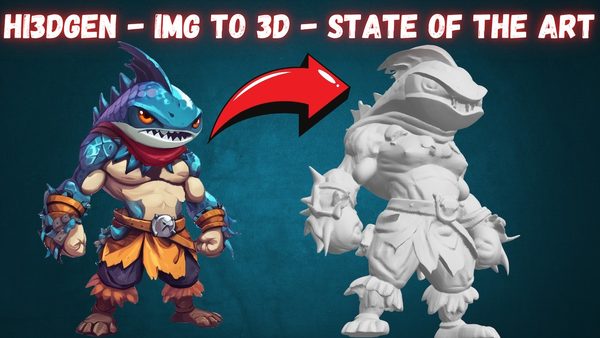
Hi3DGen Image to 3D Mesh Generator App: 1-Click Windows & Cloud
Hi3DGen turns a single image into a detailed, UV-unwrapped 3D mesh on your own PC; on an RTX 5090 our dwarf example became a 344,622-face mesh in 1 minute.
Qwen Image vs FLUX Dev vs FLUX Krea: New Text-to-Image King Comparison
Qwen Image compared with FLUX Dev and FLUX Krea over 700 generations; Qwen follows prompts far better and has a 68% bigger native resolution than FLUX Dev.
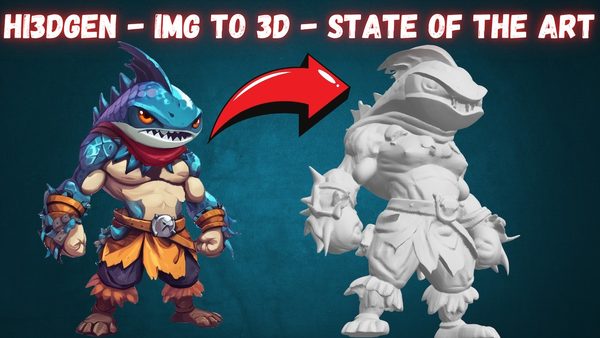
Hi3DGen Full Tutorial: Image to 3D Mesh Generation on Windows & Cloud
Hi3DGen generates detailed 3D meshes from static images, better than TRELLIS and Hunyuan3D-2.0; the tutorial shows install, presets and batch processing.
Chapters
- 0:00 Introducing Hi3DGen: State-of-the-Art Image-to-3D Model
- 0:34 Advanced Gradio App Features & One-Click Installation
- 1:17 In-Depth App UI Features: Presets & 3D Result Analysis
- 2:14 How to Download & Install Hi3DGen App on Windows
- 2:55 Starting the Fully Automatic Windows Installation Process
- 3:38 Pro Tip: Upscale Input Images with SUPIR for Best Quality
- 4:25 App Parameter Guide and Batch Processing Folder Setup
- 5:12 How to Install and Use on Cloud GPUs (RunPod & Massed Compute)
- 5:46 Installation Complete & How to Resume Failed Model Downloads
- 6:11 Starting The App & Running Your First 3D Generation
- 6:54 Understanding the Generation Process & The Slow xatlas Step
- 8:04 Analyzing The First Generated 3D Mesh in The UI
- 8:26 Locating & Checking The Automatically Saved 3D Files (OBJ, GLB, STL)
- 8:54 How to Set Up & Start Batch Processing Multiple Images
- 9:39 Monitoring Batch Progress & Using The Cancel Feature
- 10:15 Detailed Step-by-Step Guide for RunPod Installation
- 10:55 Detailed Step-by-Step Guide for Massed Compute Installation
- 11:41 Teaser: Ultimate Video Upscaling App Coming Soon
About this video
Hi3DGen is the newest state of the art image to 3D mesh generation model. In this tutorial I will show you step by step how to install and use this amazing open source AI model to generate the very best 3D meshes from static images and use in your projects.
🔗Follow below link to download the zip file that contains App installer - the one used in the tutorial ⤵️
▶️ https://www.patreon.com/posts/The-App-Installer-130766890
🔗 Requirements - Python, Git, CUDA, C++, FFMPEG, MSVC installation tutorial ⤵️
▶️ https://youtu.be/DrhUHnYfwC0
🔗 SECourses Official Discord 10500+ Members ⤵️
▶️ https://discord.com/servers/software-engineering-courses-secourses-772774097734074388
🔗 Stable Diffusion, FLUX, Generative AI Tutorials and Resources GitHub ⤵️
▶️ https://github.com/FurkanGozukara/Stable-Diffusion
🔗 SECourses Official Reddit - Stay Subscribed To Learn All The News and More ⤵️
▶️ https://www.reddit.com/r/SECourses/
🔗 SUPIR Image Upscaling App Tutorial for Upscaling Images With Really Adding New Details ⤵️
▶️ https://youtu.be/OYxVEvDf284
DetailVerse: The Fuel for High-Fidelity
High-quality models require high-quality data. The researchers found that existing 3D datasets like Objaverse, while large, are dominated by objects with simple geometry and plain surfaces. Training on such data inherently limits a model's ability to generate complex details.
To solve this, they built DetailVerse, a massive synthetic dataset of 700,000 high-quality 3D assets specifically designed to be rich in geometric complexity. The creation pipeline is a feat of engineering in itself:
Text Prompt Curation: Starting with 14 million text prompts, they used LLMs to filter, classify, and standardize them to describe diverse, single-objects with clear geometric attributes.
High-Quality Image Generation: The state-of-the-art text-to-image model Flux.1-Dev was used to generate images from these prompts, with specific instructions for isometric views and high detail.
Robust 3D Synthesis: The powerful image-to-3D model Trellis was used to convert these images into 3D meshes.
Rigorous Quality Control: The resulting 3D assets underwent a strict filtering process, using both automated checks (a DINOv2-based quality classifier) and human expert evaluation to ensure only the highest-quality, artifact-free models made it into the final DetailVerse dataset.
Results: Setting a New State of the Art
Hi3DGen's performance was rigorously evaluated, and the results speak for themselves.
Qualitative Superiority: As seen in numerous visual comparisons, Hi3DGen consistently generates 3D models with superior detail and fidelity to the input image. It excels at capturing complex textures, sharp edges, and subtle surface variations that other models miss entirely.
Quantitative Dominance: In quantitative benchmarks for normal estimation, NiRNE significantly outperforms both regression-based and diffusion-based methods on key metrics like Normal Error (NE) and Sharp Normal Error (SNE).
User-Approved: In a user study involving both amateur 3D users and professional 3D artists, Hi3DGen's results were overwhelmingly preferred over five other leading models, including Hunyuan3D-2.0, Dora, Clay, Tripo-2.5, and Trellis.
Hi3DGen represents a significant leap forward in single-image 3D generation. By rejecting the direct 2D-to-3D approach and instead adopting a "normal bridging" strategy, the framework effectively decomposes a complex problem into solvable parts. The combination of a specialized normal estimator (NiRNE), a regularized geometry generator (NoRLD), and a purpose-built, detail-rich dataset (DetailVerse) creates a synergistic system that achieves unprecedented fidelity.
Video Chapters
0:00 Introducing Hi3DGen: State-of-the-Art Image-to-3D Model
0:34 Advanced Gradio App Features & One-Click Installation
1:17 In-Depth App UI Features: Presets & 3D Result Analysis
2:14 How to Download & Install Hi3DGen App on Windows
2:55 Starting the Fully Automatic Windows Installation Process
3:38 Pro Tip: Upscale Input Images with SUPIR for Best Quality
4:25 App Parameter Guide and Batch Processing Folder Setup
5:12 How to Install and Use on Cloud GPUs (RunPod & Massed Compute)
5:46 Installation Complete & How to Resume Failed Model Downloads
6:11 Starting The App & Running Your First 3D Generation
6:54 Understanding the Generation Process & The Slow xatlas Step
8:04 Analyzing The First Generated 3D Mesh in The UI
8:26 Locating & Checking The Automatically Saved 3D Files (OBJ, GLB, STL)