Expand Any Image Beyond Its Edges: FLUX.1 Fill Outpainting and Inpainting in SwarmUI, Locally
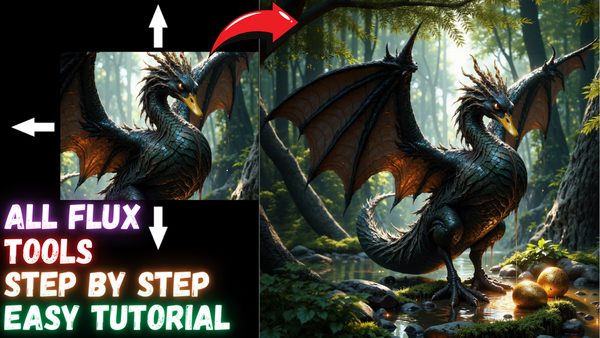
FLUX.1 Tools complete SwarmUI tutorial: inpaint and outpaint with FLUX Fill, restyle and combine images with Redux, and guide images with Depth and Canny.
Published Dec 02, 2024 · 18,951 views · Watch on YouTube
Get the app and files
FLUX Tools SwarmUI Tutorial: Inpainting, Outpainting, Redux & Canny
FLUX.1 Tools complete SwarmUI tutorial: inpaint and outpaint with FLUX Fill, restyle and combine images with Redux, and guide images with Depth and Canny.
Chapters
- 0:00 Introduction to step by step FLUX Dev Tools tutorial
- 2:21 Windows: main part of the tutorial for learning everything about SwarmUI and FLUX Tools
- 3:20 How to do a fresh install and update of SwarmUI
- 4:45 How to set automatic back-end update enabled for ComfyUI
- 5:09 How to update your existing SwarmUI and ComfyUI back-end into the latest version properly
- 5:45 How to download newest FLUX Tools models (Redux, Fill, Depth, Canny)
- 6:50 Updated features and mind blowing speed of SwarmUI Unified Model Downloader
- 8:38 How to start SwarmUI again after the installation
- 9:59 How to use Redux (style transfer and re-imagine) FLUX Tool model
- 10:55 How and when Image Prompt screen appears on SwarmUI
- 11:35 How exactly Model Apply Start works
- 12:45 How to see / follow what is actually happening - see logs
- 13:22 How to use Grid system to find best parameters / settings for your usage case
- 14:21 How to use FLUX Redux model to combine multiple images into a new image - style transfer
- 15:34 How to use automatic face inpainting to improve face quality and consistency with face
- 17:10 Merging 3 images at once into a new image with FLUX Redux adapter model
- 19:01 How to use FLUX Canny and Depth models
- 19:21 Beginning to show how to super easy use FLUX Canny model
- 21:20 Pay extreme attention to the aspect ratios when using Canny or Depth model
- 24:32 How to use Canny LoRA model
- 25:18 How to use FLUX Depth model
- 26:50 How to use FLUX inpainting (FLUX.1 Fill) model for inpainting task
- 27:33 How to properly use image editor of SwarmUI for inpainting
- 29:05 Best configs of FLUX fill model inpainting
- 30:28 How to make grid comparison to find best parameters for your case
- 30:57 How to remove / erase masking to fix the mask
- 31:51 Full guide for how to outpaint / expand images better than all paid apps for free with FLUX Fill model
- 34:35 Which prompting strategy works better for out-painting images
- 38:55 Where to find and follow us (SECourses) on Discord, Reddit, LinkedIn and GitHub
- 40:01 Massed Compute install and setup
- 40:43 Selecting SECourses image and using our 0.31$ coupon (50% lower price)
- 42:25 Setup ThinLinc client and connect cloud Massed Compute machine and synch and transfer your files
- 45:24 How to update existing SwarmUI and download new FLUX Tools on Massed Compute
- 49:08 How much time downloading over 80 GB of models takes on Massed Compute
- 49:18 How to start SwarmUI on a shared link to use it in your computer, phone, table but run in Massed Compute
- 49:55 How to utilize multiple GPUs in SwarmUI - e.g. dual GPU setup
- 50:40 How to terminate machine to not use any credits
- 51:05 RunPod install and setup for FLUX Tools and SwarmUI
- 52:28 Which template to use on RunPod for SwarmUI and FLUX Tools
- 52:56 How to set a RunPod port to connect via RunPod port based proxy system through your browser on any device
- 53:51 How to install SwarmUI on RunPod - fresh installation
- 55:52 How to install onnxruntime on RunPod to fix onnxruntime error that you get
- 56:21 How to download new FLUX Tools models on RunPod for SwarmUI
- 59:27 How to start using SwarmUI after FLUX Tools models downloaded and all installed, refresh models
- 60:27 Kaggle install and setup for FLUX Tools and SwarmUI
About this video
FLUX.1 Tools by BlackForestLabs changed the #AI field forever. They became the number 1 Open Source community provider after this massive release. In this tutorial, I will show you step by step how use FLUX.1 Fill model (inpainting model) to do perfect outpainting (yes this model used for outpainting) and inpainting. Moreover, I will show all features of FLUX Redux model to do style transfer / re-imagine 1 and more than 1 images combination. Furthermore, I will show you step by step how to convert input image into Depth or Canny maps and then how to use them on #FLUX Depth and Canny models. Both LoRA and full checkpoints of FLUX Depth and Canny.
🔗 Full Instructions, Configs, Installers, Information and Links Shared Post (the one used in the tutorial - Public - no-paywall) ⤵️
▶️ https://www.patreon.com/posts/tutorial-instructions-links-public-post-106135985
Preparation of this tutorial took more than 1 week and this will be the very best and easiest to follow tutorial since it is made with famous #SwarmUI. SwarmUI is as easy and as advanced as Automatic1111 SD Web UI. Biggest advantage of SwarmUI is that, it uses ComfyUI as a back-end. Therefore, It is extremely fast, VRAM optimized and supports all of the newest SOTA models as soon as they are published.
So in this tutorial I will show you how to setup SwarmUI and FLUX Dev tools on your Windows Computer, Massed Compute, RunPod and Kaggle. I will step by step explanatin and show you every tips and tricks that you need to properly do style transfer, re-imagine, inpaint, outpaint, depth and canny with FLUX.
Video Chapters
0:00 Introduction to step by step FLUX Dev Tools tutorial
2:21 Windows: main part of the tutorial for learning everything about SwarmUI and FLUX Tools
3:20 How to do a fresh install and update of SwarmUI
4:45 How to set automatic back-end update enabled for ComfyUI
5:09 How to update your existing SwarmUI and ComfyUI back-end into the latest version properly
5:45 How to download newest FLUX Tools models (Redux, Fill, Depth, Canny)
6:50 Updated features and mind blowing speed of SwarmUI Unified Model Downloader
8:38 How to start SwarmUI again after the installation
9:59 How to use Redux (style transfer and re-imagine) FLUX Tool model
10:55 How and when Image Prompt screen appears on SwarmUI
11:35 How exactly Model Apply Start works
12:45 How to see / follow what is actually happening - see logs
13:22 How to use Grid system to find best parameters / settings for your usage case
14:21 How to use FLUX Redux model to combine multiple images into a new image - style transfer
15:34 How to use automatic face inpainting to improve face quality and consistency with face
YOLO model and segment feature
17:10 Merging 3 images at once into a new image with FLUX Redux adapter model
19:01 How to use FLUX Canny and Depth models
19:21 Beginning to show how to super easy use FLUX Canny model
21:20 Pay extreme attention to the aspect ratios when using Canny or Depth model
24:32 How to use Canny LoRA model
25:18 How to use FLUX Depth model
26:50 How to use FLUX inpainting (FLUX.1 Fill) model for inpainting task
27:33 How to properly use image editor of SwarmUI for inpainting
29:05 Best configs of FLUX fill model inpainting
30:28 How to make grid comparison to find best parameters for your case
30:57 How to remove / erase masking to fix the mask
31:51 Full guide for how to outpaint / expand images better than all paid apps for free with FLUX Fill model
34:35 Which prompting strategy works better for out-painting images
38:55 Where to find and follow us (SECourses) on Discord, Reddit, LinkedIn and GitHub
40:01 Massed Compute install and setup
40:43 Selecting SECourses image and using our 0.31$ coupon (50% lower price)
42:25 Setup ThinLinc client and connect cloud Massed Compute machine and synch and transfer your files
45:24 How to update existing SwarmUI and download new FLUX Tools on Massed Compute