Convert Very Long X/Y/Z Plot Output Images Into Square Grids
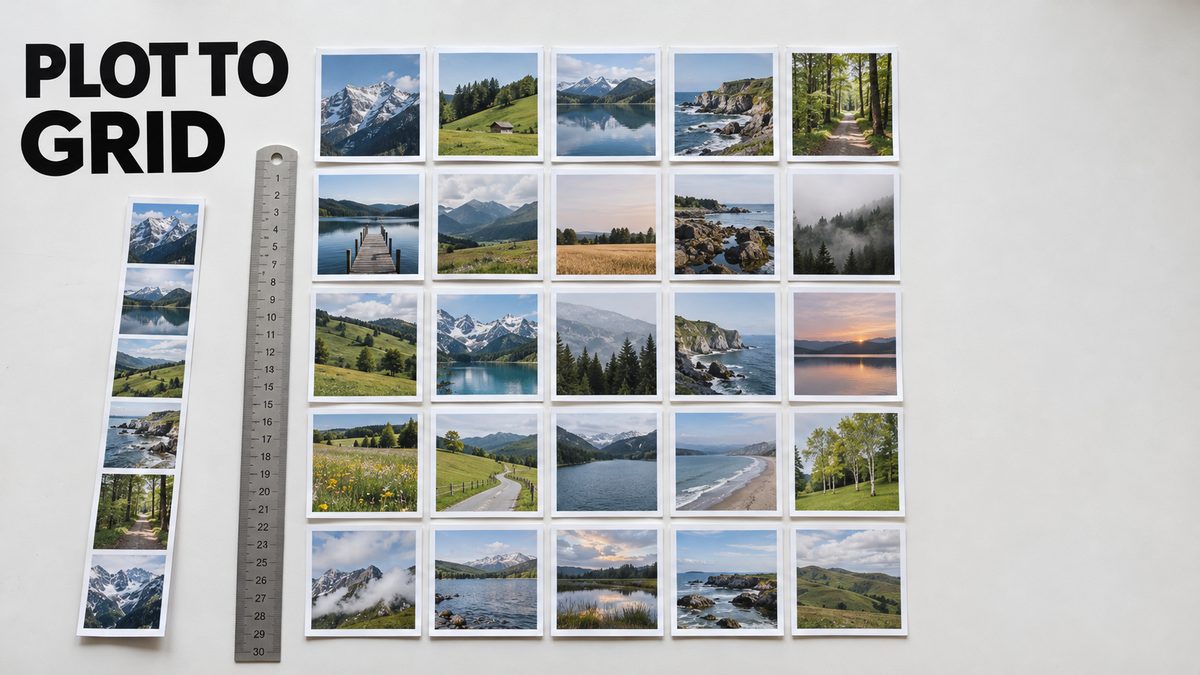
X/Y/Z plot square grid script: cuts a very long comparison output image into chunks and arranges them on one square canvas, needing only Pillow.
Highlights
Set the input image path and the chunk width and height in chunk.py, then run it with Python after pip install pillow. Includes example long and squared images and a usage screenshot.
What it does
Very long X/Y/Z plot comparison images are hard to view. This small Python script cuts a long X/Y/Z plot output image into chunks of the size you choose and places them on a square canvas, so you can see the whole comparison as a square grid.
What you get
- The chunk.py script
- An example long X/Y/Z plot output image and the squared canvas made from it
- A screenshot that shows how to use the script
- An example finding from the author's plot: denoise 0.74 gave perfect hands
Requirements
- Python with the Pillow library, installed with pip install pillow; nothing else is needed
- Edit chunk.py and set input_image_path to your image, and chunk_width and chunk_height to match your input image
- Open a command prompt and run python chunk.py
Related
Ultimate Image Processing App: 1-Click Batch Cropping, SAM 3.1 Masking
Ultimate Image Processing Premium turns raw photo folders into training-ready datasets with nine tools, from SAM 3.1 cropping to duplicate removal.
All JoyCaption Apps: 1-Click Installers With Batch Captioning
JoyCaption in four improved Gradio apps: Pre-Alpha, Alpha One, Alpha Two and the newest, fastest Joy Caption Beta One, all with batch and multi-GPU captioning.

Ultimate Image Processing App Released: Batch Crop, Resize & SAM 3.1
Ultimate Image Processing Premium by SECourses turns a folder of raw photos into a clean, framed training dataset with nine tools, including SAM 3.1 cropping.